Skip to product information

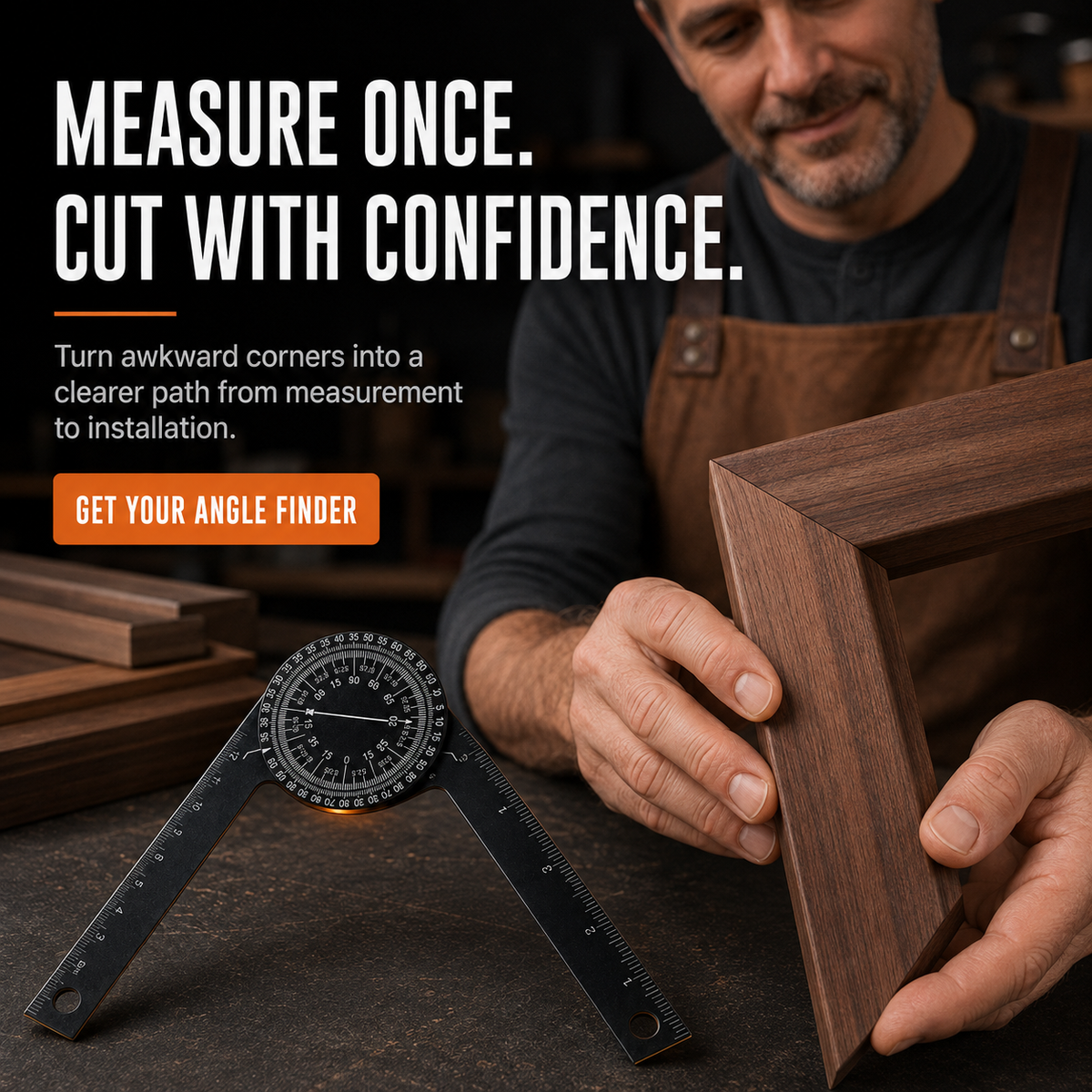
πŸ“ Aluminum Miter Saw Protractor – Dual-Scale Angle Finder

πŸ“ Aluminum Miter Saw Protractor – Dual-Scale Angle Finder

 (xxxx Reviews)
Regular price $26.99
Regular price $26.99 Sale price $52.99
SAVE 49% Sold out
 
 
add_shopping_cart

-

Ordered

local_shipping

- - -

Order Ready

redeem

- - -

Delivered

πŸ“ Aluminum Miter Saw Protractor – Dual-Scale Angle Finder

πŸ“ Aluminum Miter Saw Protractor – Dual-Scale Angle Finder

Regular price $26.99
Regular price $26.99 Sale price $52.99
SAVE 49% Sold out

Measure the angle. Read the saw setting.

Stop Guessing Your Miter Angles πŸ“

Copy awkward corners directly, read the appropriate cut scale and move to your next step with more confidenceβ€”without stopping to calculate every angle by hand.

βœ“ Dual Cut Scales
βœ“ Adjustable Aluminum Arms
βœ“ Measure & Mark
Β 

The problem

One Wrong Angle Can Waste the Whole Cut.

Unusual corners and sloped framing can turn a simple project into repeated measuring, calculations and test cuts.

  • Guessing which angle to enter on the miter saw
  • Re-cutting boards that do not fit the first time
  • Switching between multiple measuring and marking tools
Β 

A faster way to measure

Fit the Arms. Read the Scale.

Open the two arms until they sit against the surfaces you need to match. The center dial provides dedicated readings for a single-piece cut or a two-piece miter joint.

Less angle math. Fewer avoidable test cuts. A clearer path from measurement to installation.

Three simple steps

From Awkward Corner to Clear Cut Setting

Use the tool as a practical bridge between the jobsite angle and your cutting setup.

1

Match the Angle

Place one arm against each surface and open the tool until both sides sit flush.

2

Choose the Scale

Read the Single Cut scale for one fitting piece or the Miter Cut scale for a joint.

3

Set, Mark & Cut

Transfer the measurement to the workpiece or use the reading to set your miter saw.

Two readings. One clear dial.

Know Which Angle You Actually Need

The high-contrast circular dial separates single-piece fitting from two-piece miter joints.

Β 
OUTER SCALE

Single Cut

Use when one piece needs to be cut so it fits against an existing angled surface.

INNER SCALE

Miter Cut

Use when two pieces meet to form a miter joint and the total angle must be divided correctly.

Β 

More than a protractor

Measure, Transfer and Mark With One Tool

Integrated ruler markings along the arms help with basic layout work, while the slim hinged design reaches into common jobsite corners.

Aluminum BodyBlack aluminum construction with clear white markings.
Dual Scale DialSeparate readings for single and miter cuts.
Ruler MarkingsUseful for common measuring and layout tasks.
Hanging HolesOne opening at the end of each measuring arm.

Built for real projects

Useful Wherever Angles Refuse to Cooperate

Keep it ready for framing, finish work and everyday DIY projects around the home or workshop.

🏠 Wood Framing
πŸ“ Baseboards
πŸͺš Trim & Molding
πŸšͺ Door Frames
πŸ–Ό Picture Frames
🧰 DIY Furniture
πŸͺ΅ Shelving
πŸ”¨ Renovation Work

Product details

What You’re Working With

Product Type Manual Miter Saw Protractor & Angle Finder
Material Aluminum
Color Black with White Markings
Scale Design Single Cut Outer Scale + Miter Cut Inner Scale
Measuring Design Two Hinged Adjustable Arms
Additional Markings Integrated Ruler Markings Along the Arms
Power Required None
Recommended For Woodworking, Carpentry, Framing, Trim & DIY Projects

Safety note: Confirm the reading before cutting, follow your saw manufacturer’s instructions and make a test cut on scrap material when fit is critical. Keep hands clear of blades and moving equipment.

Good to know

Frequently Asked Questions

What is the difference between the two scales?+
The outer Single Cut scale is intended for fitting one piece to an angle. The inner Miter Cut scale is intended for a joint where two pieces meet.
Does the tool attach to the miter saw?+
No. It measures the jobsite angle and gives you a reference setting to enter on your miter saw. Always follow the instructions for your specific saw.
Can it be used for inside and outside angles?+
The hinged two-arm design can be positioned against many common inside and outside corners. Make sure both arms sit flush before reading the dial.
Is it a digital tool?+
No batteries or electronics are required. Angles are read directly from the printed mechanical dial.
How do I care for it?+
Keep the pivot and scale free of dust and debris, wipe the tool with a soft dry cloth and store it where the arms will not be bent or damaged.

Measure Once. Cut With Confidence.

Bring the angle from the project to the saw setting with one compact, easy-to-read woodworking tool.

CHOOSE YOUR OPTION ABOVE
  • Share positive thoughts and feedback from your customer.

    Author
  • Share positive thoughts and feedback from your customer.

    Author
  • Share positive thoughts and feedback from your customer.

    Author
    check_box

    Collapsible row

    View full details

    Custom columns

    Use the flexible grid system to create any layout. Each block can be placed in any of the columns.

    check_circle
    Icon with text

    Pair text with an icon to focus on your chosen product, collection, or blog post

    check_circle
    Icon with text

    Pair text with an icon to focus on your chosen product, collection, or blog post

    check_circle
    Icon with text

    Pair text with an icon to focus on your chosen product, collection, or blog post

    check_circle
    Icon with text

    Pair text with an icon to focus on your chosen product, collection, or blog post

    Image/Video Slider

      check_circle
      Icon with text

      Pair text with an icon to focus on your chosen product, collection, or blog post

      check_circle
      Icon with text

      Pair text with an icon to focus on your chosen product, collection, or blog post

      check_circle
      Icon with text

      Pair text with an icon to focus on your chosen product, collection, or blog post

      Content heading

      Pair icons with content to focus on your chosen product, collection, or blog post. Add details on availability, style, or even provide a review.

      Button label
      • Heading

        Share positive thoughts and feedback from your customer..

        Author

      • Heading

        Share positive thoughts and feedback from your customer..

        Author

      • Heading

        Share positive thoughts and feedback from your customer..

        Author