



🛠️✨ Precision Corner Radius Router Template – Perfect Rounded Corners Made Easy! 📐🪵 | Multi-Size Woodworking Guide for DIY & Professionals 🔥
🛠️✨ Precision Corner Radius Router Template – Perfect Rounded Corners Made Easy! 📐🪵 | Multi-Size Woodworking Guide for DIY & Professionals 🔥

BUNDLE & SAVE
Couldn't load pickup availability

🛠️✨ Precision Corner Radius Router Template – Perfect Rounded Corners Made Easy! 📐🪵 | Multi-Size Woodworking Guide for DIY & Professionals 🔥
Make The First Corner. Then Make The Next One Match.
Choose a radius, align the rigid template to your workpiece and use it as a repeatable routing guide for cleaner rounded corners across panels, shelves, cabinets and furniture projects.

Eyeballing A Curve Makes Consistency Harder Than It Needs To Be.
Drawing a curve by hand, sanding to the line and trying to repeat the same shape on every corner leaves more room for small differences.
A fixed radius template gives the router a defined path, helping you reproduce the same selected corner profile across the project.
Choose a marked radius instead of trying to recreate the curve by eye.
Return to the same guide slot when another corner needs the same profile.
Consistent corner geometry helps the finished piece feel more intentional.
Choose A Subtle Radius Or Make The Corner Noticeably Softer.
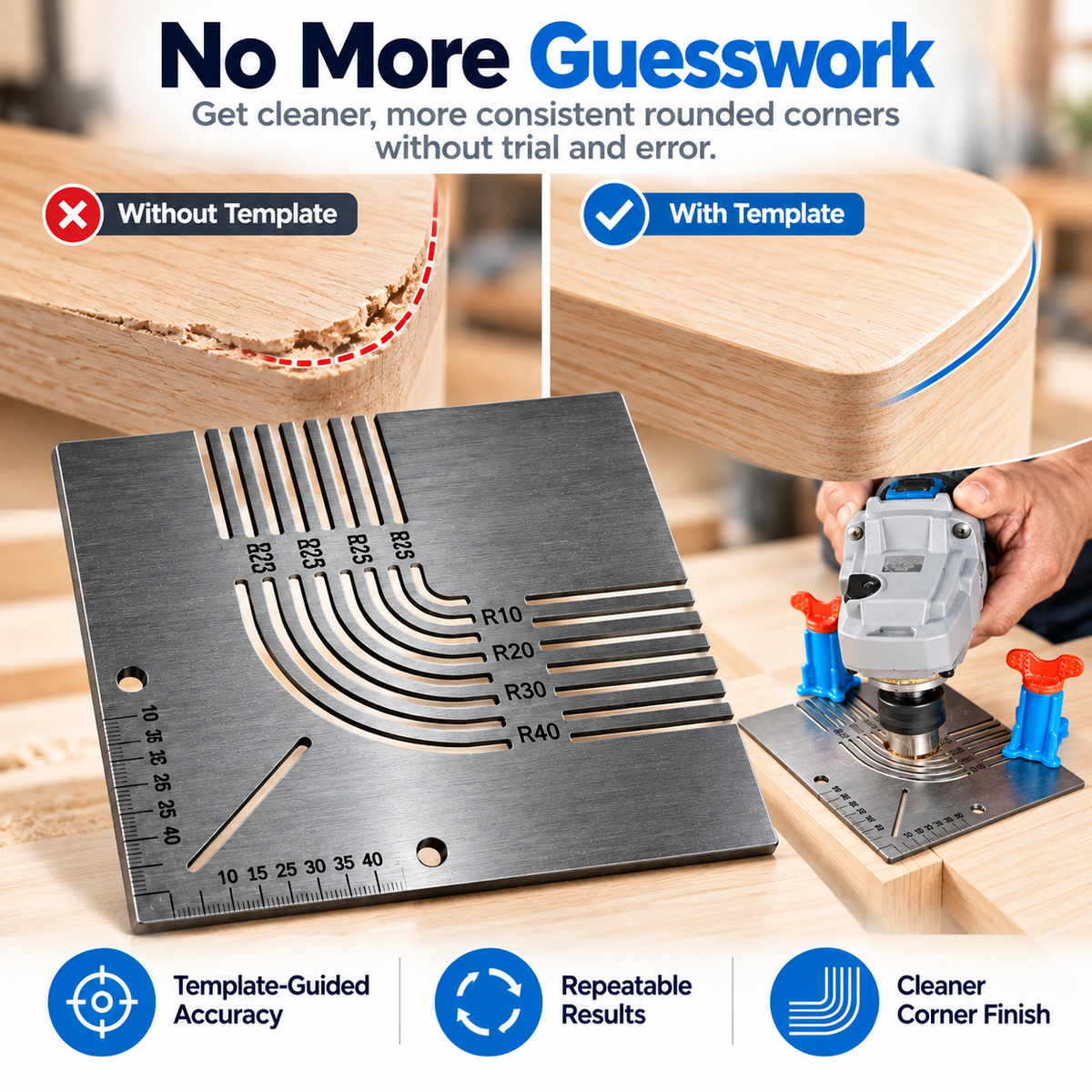
The template is marked with multiple radius guides spanning approximately R6 through R40, giving you several corner profiles on the same plate.

Turn The Corner Into A Repeatable Three-Step Job.
Align the selected corner guide to the workpiece and secure the template so it cannot shift during routing.
Use a compatible trim-router setup and follow the chosen template profile with controlled passes.
Remove the guide and finish the edge as required by your project.

Rigid Metal Body. Clearly Marked Cutouts.
Current product imagery shows a solid metal template with machined radius slots, straight slots, mounting holes and measurement markings around the lower edges.
The rigid plate provides a stable physical reference when secured correctly to the workpiece.

Change The Shape Without Guessing Where The Curve Should End.
A selected radius gives you a defined transition between the straight edges and the rounded corner.
That can give shelves, panels and tabletops a softer, more finished appearance than an untouched square corner.

Cabinets. Shelves. Furniture Panels. DIY Builds.
Current product imagery positions the template for everyday woodworking projects where a repeatable rounded edge is useful.
Round exposed corners on compatible cabinet panels and doors.
Give shelf ends a softer, more finished profile.
Repeat the same radius across matching corners.
Use the guide anywhere the workpiece and routing setup are compatible.

Set The Radius Once. Reuse The Same Reference.
When several corners need to match, consistency matters more than improvisation.
Reusing the same marked radius guide gives you a common reference for each compatible corner in the build.
Return to the same radius slot across multiple workpiece corners.
Use one template instead of redrawing the curve every time.
A reusable routing guide can become part of your normal corner-shaping setup.

Built Around Repeatable Corner Shaping.
Current imagery shows radius options spanning approximately R6 through R40.
The template is shown as a solid metal plate designed to provide a stable routing reference.
Markings on the plate help identify the available radii and edge measurements.
Current imagery demonstrates the template being secured to a board and used with a trim router.
The fixed guide profiles help provide a common reference for matching corner shapes.
Shown applications include cabinets, shelving, furniture panels and general DIY builds.
What The Current Product Imagery Clearly Supports.
Product images demonstrate the template with a trim router and clamps, but the current listing does not clearly confirm that the router or illustrated clamps are included. Treat them as separate workshop tools unless your selected package explicitly states otherwise.
Exact plate dimensions, plate thickness, metal grade, included hardware and compatible router-bit/bearing specifications are not clearly confirmed on the current page, so they are intentionally not invented here.
Before The Router Touches The Workpiece.
What is this template used for?
It is used as a physical guide for creating repeatable rounded corners on compatible woodworking panels, shelves, cabinets, tabletops and similar projects.
What radius sizes does it include?
Current product imagery shows multiple radii spanning approximately R6 through R40, including intermediate marked guide sizes.
Can I use it with a trim router?
Yes. Current product imagery specifically demonstrates the template being secured to a wooden board and used with a trim router. Your bit, bearing and routing setup must still be compatible with the guide.
How do I use it?
Select the radius, align the template to the workpiece corner, secure it firmly, then use a compatible router setup to follow the guide before removing the template and completing any required finishing.
Why use a template instead of drawing the curve by hand?
A fixed guide gives you a repeatable physical reference, which is useful when several corners are intended to share the same radius.
Is the template metal?
Yes. Current imagery describes and shows a rigid metal template body.
Are the router and clamps included?
They are shown in usage demonstrations, but the current listing does not clearly confirm them as included accessories. Assume they are separate unless the selected package specifically states otherwise.
Can I use it on every type of wood?
Compatibility depends on the workpiece, thickness, material, router bit, bearing, tool setup and cutting method. Follow the router and bit manufacturer's guidance for the material being machined.
Do I still need to secure the template?
Yes. Current imagery shows the guide being held securely in place before routing. The template should not be allowed to shift while a router is following the selected profile.
Stop Re-Drawing The Same Corner On Every Board.
Select the profile, secure the template and give every compatible corner in the project the same physical routing reference.
Secure the workpiece and template before routing. Wear appropriate eye and hearing protection and follow the router and cutting-tool manufacturer's safety instructions.


