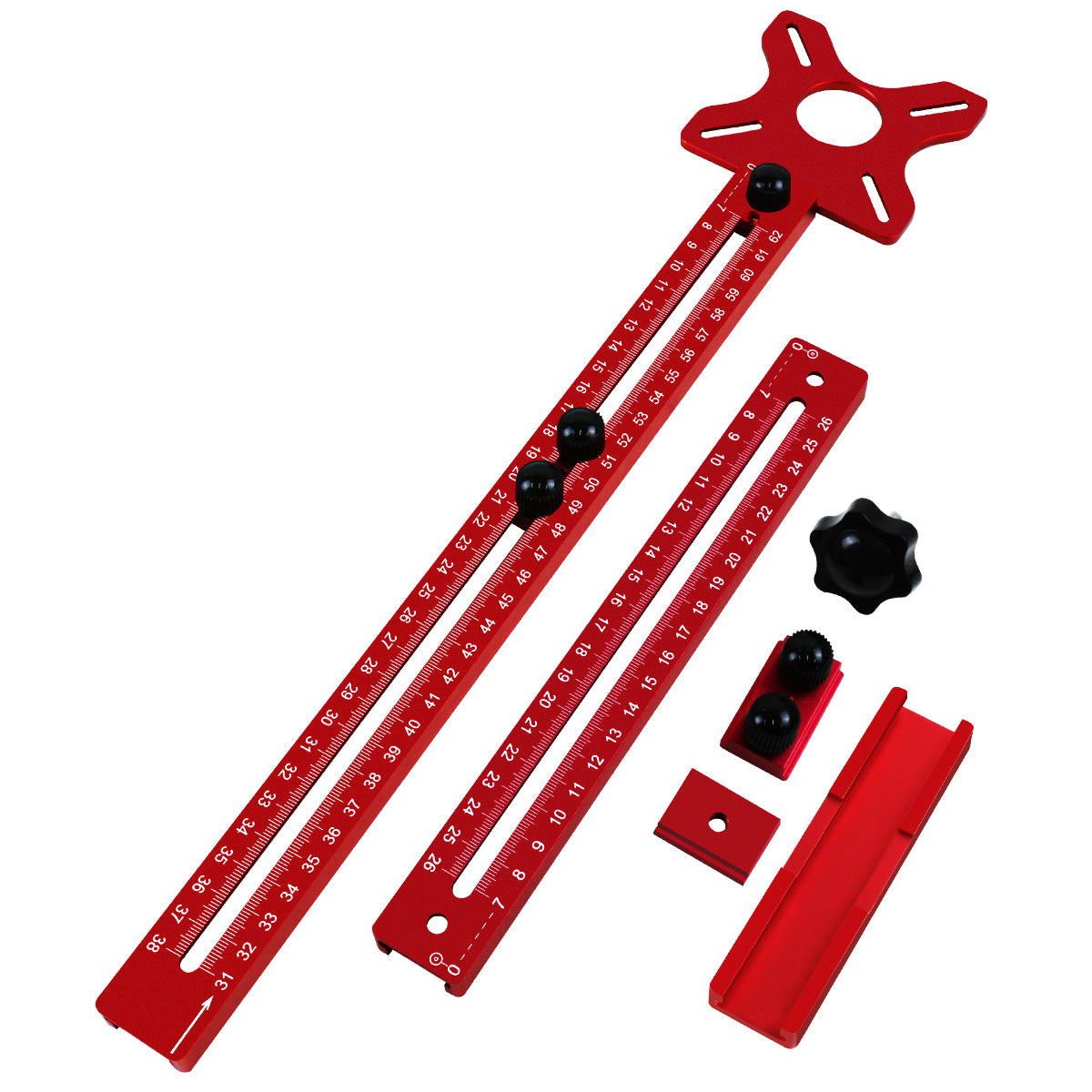
🪚 Adjustable Router Circle Cutting Jig – Precision Radius & Edge Guide for Woodworking 🔧
🪚 Adjustable Router Circle Cutting Jig – Precision Radius & Edge Guide for Woodworking 🔧

BUNDLE & SAVE
Couldn't load pickup availability

🪚 Adjustable Router Circle Cutting Jig – Precision Radius & Edge Guide for Woodworking 🔧
BETTER CIRCLES.
LESS GUESSWORK.
Ever tried routing a perfect circle freehand, only to lose the shape halfway through? Set a fixed center, adjust your radius and guide your router along a controlled path with this adjustable woodworking circle and edge guide.

Stop Chasing the Circle.
Freehand routing makes it difficult to maintain a consistent curve. A fixed pivot gives your router a center point to follow, helping create cleaner, more consistent circular layouts.
Hand-guided movement can wander away from the intended circle.
A fixed center helps maintain the selected routing radius.

Set Your Radius with Confidence.
The marked guide rail lets you position the pivot for your intended layout. Slide to the desired setting and tighten the knurled locking knobs before routing.
Read the graduation marks along the guide rail.
Secure the adjustable parts in their selected positions.

Bigger Circles. Same Fixed Center.
Working on a larger circular project? The Extended version adds a matching rail section, giving the pivot-guided setup more reach for wider layouts.
Adds reach for larger circular routing layouts.
Maintain the selected center while tracing an arc.

Straight Grooves. A Steady Offset.
The matching edge fence can guide the router along a board edge. Set the desired offset and keep the fence against the workpiece to help maintain a consistent groove position.
Use the board edge as a guiding surface.
Position the guide for the required groove location.

A Mounting Plate with Room to Work.
The star-shaped mounting plate features slotted attachment points and a large central opening. This layout provides mounting options while leaving access for the router cutter.
Multiple slots help accommodate suitable mounting arrangements.
The central opening provides clearance for the cutting area.

Round Ideas. Real Projects.
From circular openings to round wooden components and curved decorative profiles, this adjustable guide gives woodworkers more ways to explore circular designs.
Plan circular cutouts in suitable wood panels.
Create rounded woodworking shapes and components.
Explore decorative curves and circular edge layouts.
Add a guided routing option to your workshop.

Two Colors. Two Kit Versions.
Choose a bold red or vibrant orange finish, then select the Standard or Extended version to suit the size of your woodworking projects.
Standard guide configuration in red.
Standard guide configuration in orange.
Extended rail configuration in red.
Extended rail configuration in orange.

The Details at a Glance.
- Product Type
- Router Circle & Edge Guide
- Main Function
- Adjustable Circle Routing
- Additional Function
- Edge-Guided Straight Grooves
- Radius Adjustment
- Sliding Guide Rail
- Measurement Detail
- Graduated Scale Markings
- Locking System
- Knurled Locking Knobs
- Mounting Base
- Slotted Star-Shaped Plate
- Guide Fence
- Adjustable Edge Fence
- Color Choices
- Red / Orange
- Kit Versions
- Standard / Extended
Frequently Asked Questions.
What is this router guide used for?
It helps guide a compatible woodworking router during circular routing and edge-guided straight-groove projects.
Can I adjust the circle size?
Yes. The guide rail has scale markings and adjustable locking knobs for setting different pivot positions.
What is the difference between Standard and Extended?
The Extended configuration includes additional rail length for larger routing layouts, while Standard uses the shorter guide configuration.
Does the guide work for straight grooves?
Yes. The pictured edge-fence attachment allows guided routing along a suitable straight board edge.
How do I check router compatibility?
Compare your router's base mounting pattern with the guide plate's slots and center opening. Follow the router manufacturer's instructions when attaching accessories.
How should I prepare before routing?
Disconnect the router from power before making adjustments, secure your workpiece, tighten the guide components and wear appropriate eye and hearing protection.
Set Your Radius. Shape Your Next Project.
From round openings to curved profiles and guided grooves, give your router a more controlled path with an adjustable circle and edge guide.
NC0311