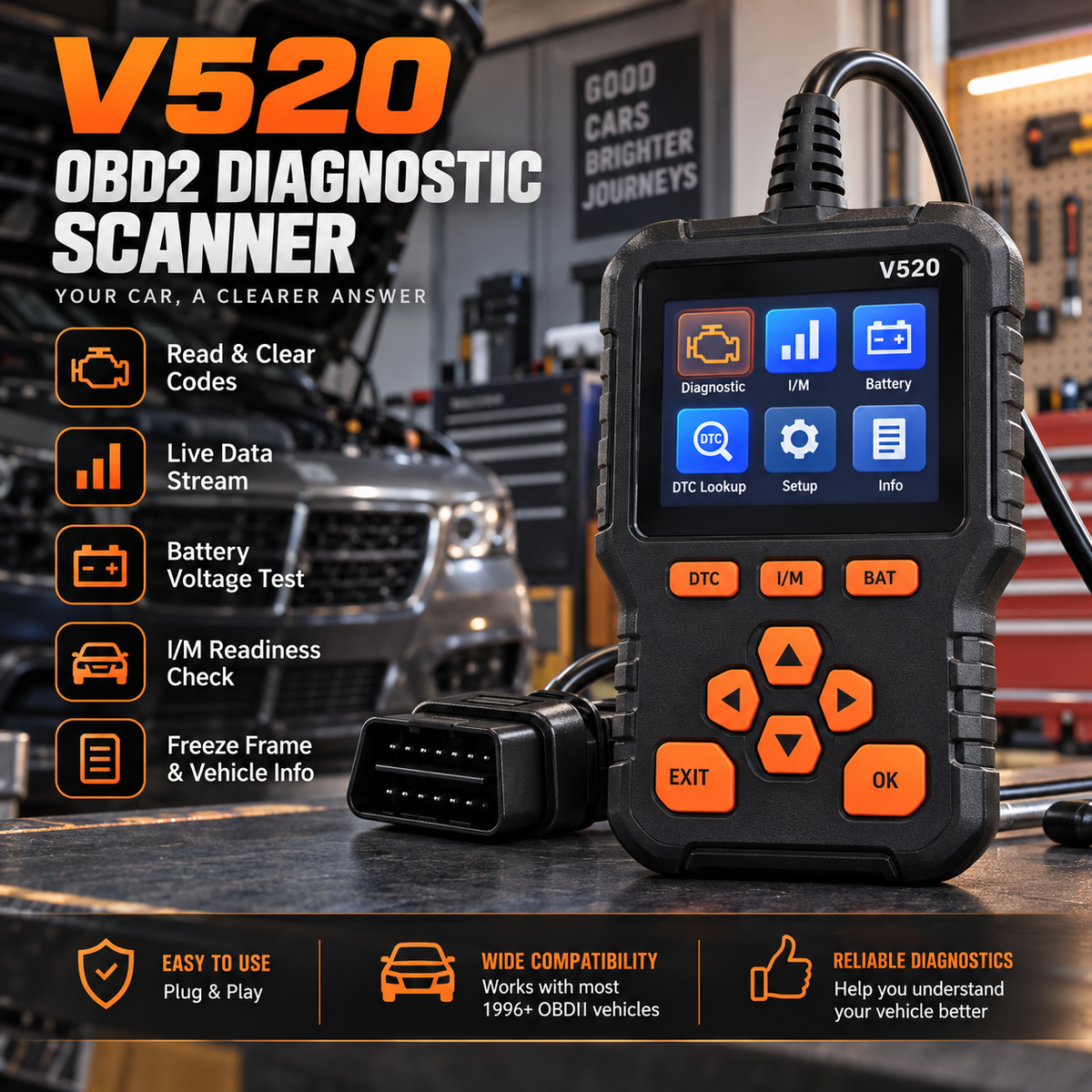
V520 OBD2 Scanner Car Diagnostic Tool, Code Reader with Live Data Stream, Battery Voltage Test & I/M Readiness for All OBDII Vehicles
V520 OBD2 Scanner Car Diagnostic Tool, Code Reader with Live Data Stream, Battery Voltage Test & I/M Readiness for All OBDII Vehicles

BUNDLE & SAVE
Couldn't load pickup availability
-
Ordered
- - -
Order Ready
- - -
Delivered

V520 OBD2 Scanner Car Diagnostic Tool, Code Reader with Live Data Stream, Battery Voltage Test & I/M Readiness for All OBDII Vehicles
Stop Guessing What Triggered The Check Engine Light. 🔧
Plug the V520 directly into the OBDII port to read fault codes, check live engine data, review I/M readiness and view battery voltage from one standalone handheld scanner.

No Bluetooth Setup. No Separate Battery. Just Connect And Scan.
Connect the V520 to a compatible vehicle's OBDII port. The scanner receives power through the vehicle connection, so the core diagnostic functions work directly from the handheld unit.
Find the vehicle's compatible OBDII port, commonly located below the dashboard.
Plug the scanner directly into the OBDII connector.
Switch the ignition on and select the diagnostic function you need.


Read The Code Before You Start Guessing. 🔍
A warning light tells you the vehicle detected a problem. A diagnostic trouble code gives you more useful information about what triggered that warning.
Retrieve supported diagnostic trouble codes stored by the vehicle.
Review the code and available on-screen information.
Clear supported codes after the underlying issue has been addressed.
See What The Vehicle Is Reporting While It's Running.
Live Data goes beyond a single stored code by displaying supported real-time vehicle parameters while the engine is operating.


See Supported Emissions-Monitor Status At A Glance.
The dedicated I/M function lets you review supported onboard monitor status before an emissions inspection, including whether applicable monitors report Ready or Not Ready.
Check Vehicle Voltage From The Same Handheld Scanner.
Press the dedicated BAT shortcut to view real-time battery voltage through the connected OBDII system.
Display real-time vehicle voltage on the scanner.
Dedicated physical button gives fast access to the voltage screen.
Combine code reading and voltage information in one handheld tool.


Look At The Conditions Captured When A Fault Was Set.
Freeze Frame can show supported vehicle conditions captured around the time a diagnostic trouble code was stored, while Vehicle Information provides access to supported identification data.
Review supported captured fault-condition data.
Access supported vehicle identification information.
Use additional data to better understand what happened.
Keep A Dedicated Scanner Where You Can Reach It.
The handheld V520 works as a standalone scanner for compatible OBDII vehicles, making it practical to keep in the garage or vehicle for basic diagnostic checks.

Get More Information Before You Start Replacing Parts. 🔧
🔍 Read & Clear DTC
Start with the fault code instead of the guess.
Retrieve supported engine-related trouble codes and clear them after the cause has been addressed.
📊 Live Data
See supported values while the vehicle is running.
Review real-time engine and vehicle data for more diagnostic context.
✅ I/M Readiness
Review supported monitor status before inspection.
Check applicable emissions-monitor readiness from the handheld screen.
🔋 Voltage
Add battery-voltage information to the same check.
Use the dedicated BAT function to view real-time vehicle voltage.
Quick Answers Before You Plug It In. 🚗
🚗 Does the V520 work with every car?
🔍 Can it read check-engine codes?
🧹 Can it clear the check-engine light?
📊 Does it display live data?
✅ Can I check emissions readiness?
🔋 Does it include a battery-voltage function?
📱 Do I need an app to use the main diagnostic functions?
⚠️ Does the scanner repair the vehicle?
A Check Engine Light Is A Warning — Not An Explanation. 🔍
Plug in the V520, read the code, check live data, review readiness and get a clearer picture of what the vehicle is actually reporting before deciding what comes next. 🔧
🚗 Check Your Car With The V520